Create Maps from Addresses
Beside the printer button on The Family Record
and The Individual Record is the Map Address button: 
Clicking
this button will allow you to create maps or driving instructions to that
house by searching for the addresses using Google Maps. There
must be a valid working Internet connection on the computer to perform these functions.
- Click the
 map address button.
 - The Maps and Driving Directions screen opens up:
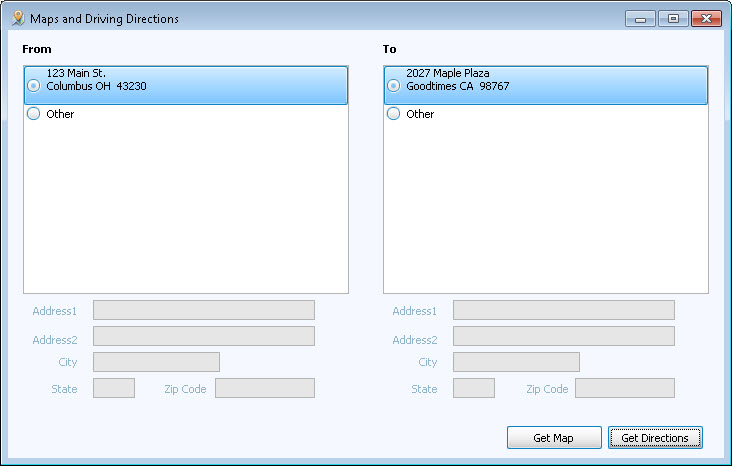
- Click to place the
 radio button by the desired address(es):
- From:
Choose to begin at the Church's address (as entered in the Organization Info section of System Information) or choose "Other" and type an alternate start address including a Street address, City, State, and Zip Code.
- To:
Choose the destination, the Family's (or Individual's) Main Address will be the default choice. If an Alternate Family Address and/or an Individual Alternate Address exist on that record, those addresses will be available to choose as well.
- From:
- Click either Get Map or Get Directions.
- Your internet browser will open to Google maps:
- For maps, the To address location will be displayed on the map.
- For directions, both the From and the To addresses from Church Windows will be automatically filled in and the directions will be displayed.
